






How Much Website Downtime Really Costs: Real Numbers, Hidden Costs, and How to Stop It
You launched an advertising campaign. The budget is being spent. Emails have been sent. Traffic is coming in. And at that exact moment, the website goes down.
Not for an hour. For twenty minutes. But right at the peak.
How much did it cost you? Most business owners honestly answer: “I do not know.” And that is part of the problem. According to ITIC research, 6 out of 10 businesses cannot even roughly calculate their cost of downtime.
This article closes that gap. You will see real numbers, learn how to calculate your losses with a simple formula, and understand which costs never show up in reports — but still exist.
Table of Contents
- What counts as downtime — and why it is broader than “the website is offline”
- Real numbers: how much downtime costs worldwide
- Loss calculator: calculate it for your business
- The hidden cost that does not appear in reports
- Downtime and SEO: how Google penalizes instability
- Uptime 99.9% vs 99.5%: the difference that costs money
- How managed hosting protects revenue before problems appear
- What to do today: protection checklist
- The main conclusion
What counts as downtime — and why it is broader than “the website is offline”
When people say “website downtime”, most imagine one thing: the page does not open, an error appears, and everyone sees that something is broken.
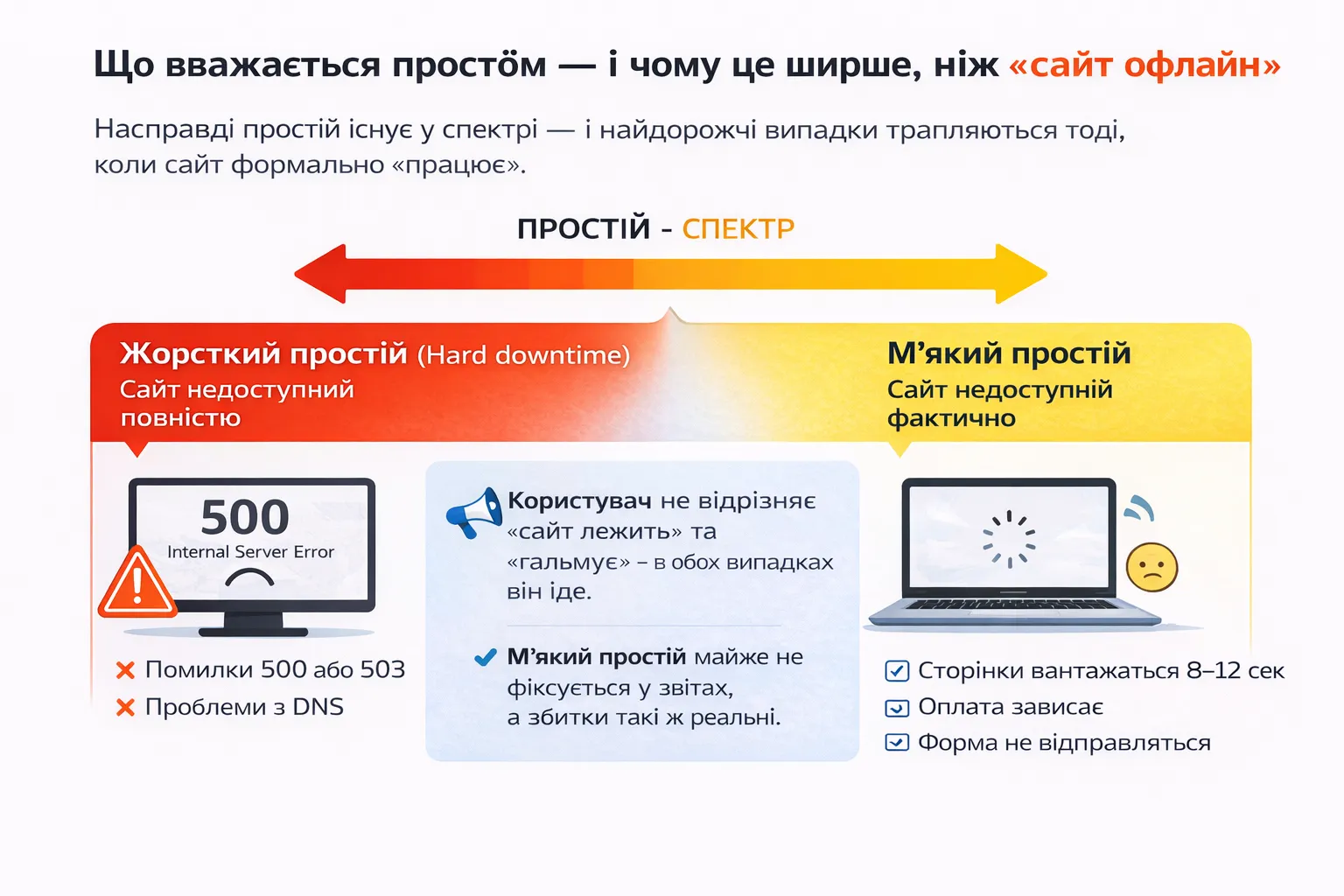
In reality, downtime exists on a spectrum — and the most expensive cases happen when the website formally “works”.
Hard downtime
The website is completely unavailable. The server does not respond, there are 500 or 503 errors, or DNS issues. It is the easiest to diagnose and usually not the longest in duration. But it is visible immediately.
Soft downtime
The website “opens”, but in practice it is unusable. Pages load for 8–12 seconds. Payment freezes. The form does not submit. Login does not work.
Here is what matters: for the user, there is no difference between “the site is down” and “the site is slow”. In both cases, they leave. The only difference is that soft downtime is almost never reflected in reports — while the losses from it are just as real.
▶️ See also: What is Website Downtime? Hard vs Soft Downtime Explained
Real numbers: how much downtime costs worldwide
Before calculating your own losses, it helps to understand the real scale of the problem worldwide.
Downtime costs the world's top 2,000 companies $400 billion every year. One Meta outage in 2024 cost almost $100 million in lost revenue. A one-hour Amazon outage was estimated at $34 million in sales.
That is big business. But small and medium-sized businesses suffer proportionally even more because they do not have backup systems or dedicated response teams.
According to Atlassian, downtime costs small businesses around $427 per minute. For medium and large businesses, the cost starts from $9,000 per minute. Some large enterprises report costs of more than $16,700 per minute of outage.
The 2025 Uptime Institute study showed that 54% of organizations reported their last significant outage cost more than $100,000, and 20% reported more than $1 million for a single incident. At the same time, 80% of operators believe better management processes could have prevented these outages.
Downtime is not force majeure. In most cases, it is a predictable and manageable problem.
Loss calculator: calculate it for your business
You do not need a complex financial model. Here is a practical three-level methodology.
Level 1 — Direct revenue loss
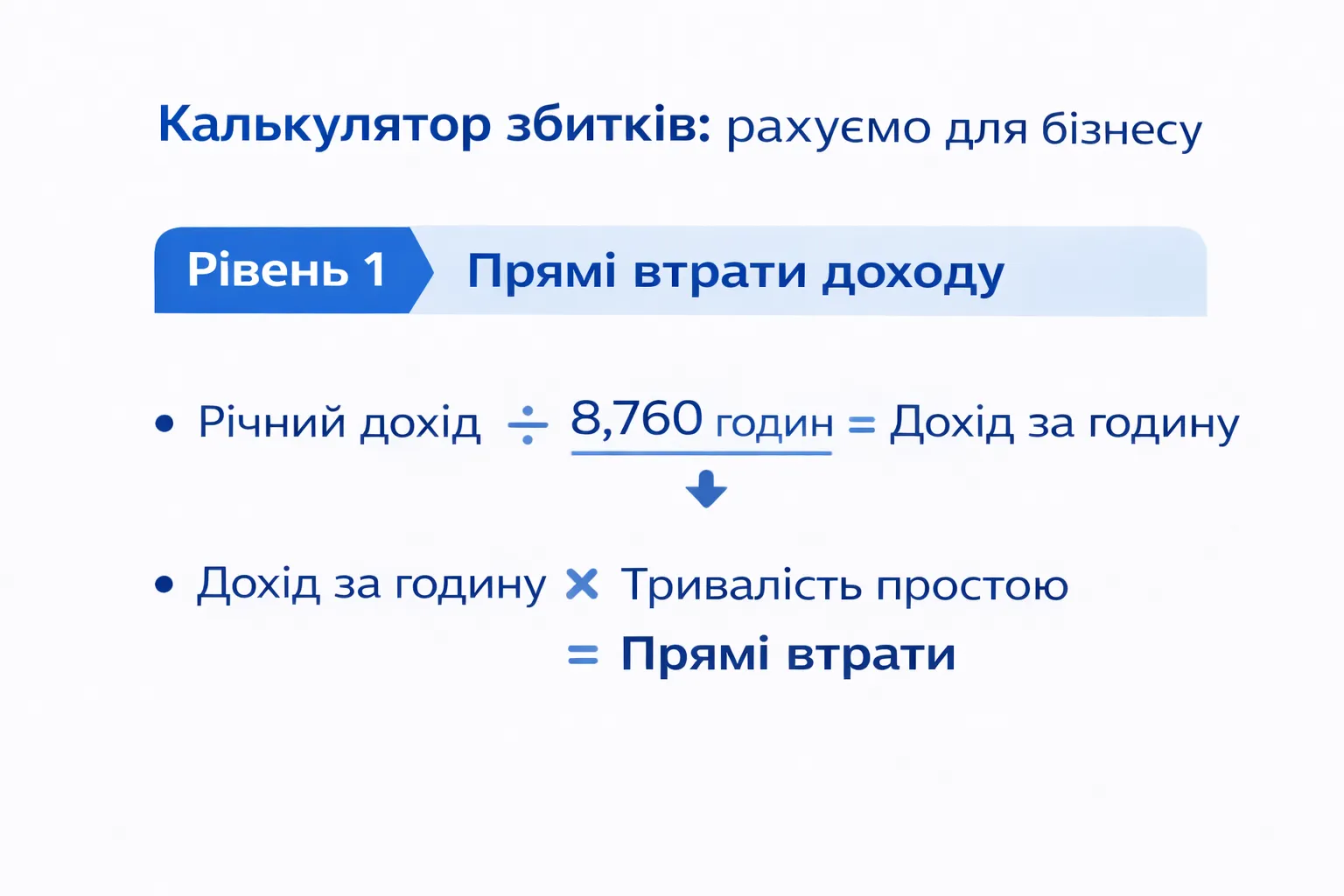
Formula:
Annual revenue ÷ 8,760 hours = Revenue per hour
Revenue per hour × Downtime duration = Direct losses
Monthly revenueRevenue per hour1 hour of downtime20 minutes of downtimeUAH 100,000~UAH 417UAH 417~UAH 139UAH 500,000~UAH 2,083UAH 2,083~UAH 694UAH 2,000,000~UAH 8,333UAH 8,333~UAH 2,778
Does not seem that scary? But this is only the first level. The real math starts next.
Level 2 — Real impact multiplier
Direct losses are only part of the damage. The full calculation looks like this: Downtime cost = (Revenue per hour) × (Downtime duration) × (Impact coefficient). The coefficient accounts for advertising budget spent without result, the behavior of the part of the audience that will not return, and other factors.
For most e-commerce businesses, the real multiplier is from 1.5 to 3x of direct revenue loss. So if the site “went down” during a campaign and direct losses were UAH 5,000, the real cost of the event may be UAH 10,000–15,000.
Level 3 — Cost of downtime during peak events
During ad campaigns, launches, and sales, the cost of every minute of outage grows several times. For example, a large retail site during a sale with 1,000 visitors per minute, an average order value of $20, and a 5% conversion rate generates $60,000 in sales per hour. One hour of downtime = $60,000 in direct losses — not including productivity costs, negative reviews, or reputational damage.
Calculate your risk right now:
- Take your planned revenue during the next campaign
- Calculate revenue per hour
- Multiply it by 2 (a conservative impact multiplier)
- This number is your financial risk from one hour of instability
The hidden cost that does not appear in reports
Direct losses are what you notice immediately. But the most expensive consequences of downtime accumulate quietly and show up weeks later.
1. Wasted advertising budget
When the website is “down”, advertising campaigns do not stop automatically. Google Ads continues showing ads. Meta targeting continues running. An email with a lead magnet continues generating clicks.
Every click costs money. But it lands on an unavailable or unstable website. There are no conversions — but the costs remain. This is a double hit: you pay for traffic and lose the revenue it could have generated.
2. Customers lost forever
Akamai research showed that 9% of visitors who encounter a website while it is “down” never return. Almost every tenth potential client is gone forever.
For a business with an LTV (lifetime customer value) of UAH 3,000–10,000, this is not just one lost sale. It is several repeat purchases, referrals, and recommendations that will never happen.
3. Loss of trust at a critical moment
When a new client visits your website for the first time and sees an error, they do not think, “Oh, technical issues happen.” They think, “Should I deal with this business at all?”
This is especially critical during launches and campaigns — exactly when new people who have no prior experience with your brand are arriving. First impressions are formed in seconds and can become the last impression.
4. Internal costs of “firefighting”
When the site goes down, revenue is not the only thing that stops. The whole team stops. Marketers switch from campaigns to crisis management. Developers drop current tasks. Support gets flooded with tickets. Managers spend time communicating with everyone.
These time costs are real — and they are rarely included in loss calculations.
Downtime and SEO: how Google penalizes instability
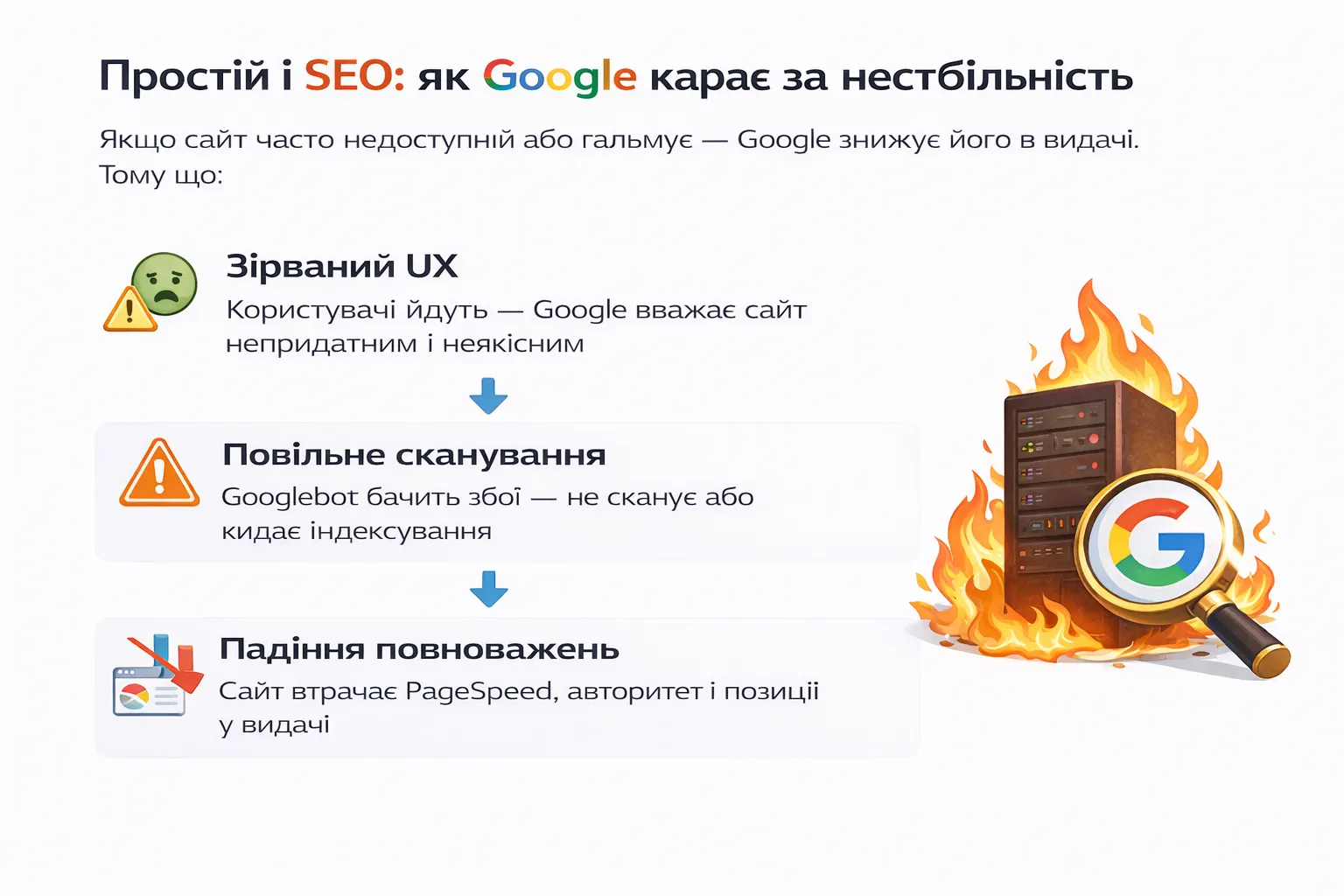
A separate and often underestimated consequence of downtime is its impact on search visibility. There are nuances here that are important to understand precisely.
How Google sees your downtime
Google indexes websites with the Googlebot crawler, which constantly visits pages. If the site returns a 500 or 503 error during a crawler visit, Google records it and comes back later.
Research by Moz SEO specialists showed that intermittent 500 errors caused tracked keywords to drop sharply in search — often falling out of the top 20 completely. Affected pages also received fewer crawls per day, meaning Googlebot starts visiting them less often — and the damage grows with each occurrence.
Timeframes: when real problems begin
Research shows that short, intermittent downtime is “perfectly acceptable” and usually does not have a significant impact. But if errors continue for more than two days, Google may completely remove these URLs from the index until the server stabilizes.
Google engineer John Mueller confirmed that after one day of downtime, rankings may “fluctuate” for 1–3 weeks. When pages return to the index, they usually return to the same positions — but only if the downtime lasted days or weeks, not months.
A slow website is also “downtime” for Google
Even 30 minutes of downtime per week can quietly undermine search visibility. If a visitor lands on the site during an instability window, Google records that session: slow loading, bounce, exit. This data enters the Chrome UX Report and affects Core Web Vitals — real metrics that Google uses in ranking.
The SEO conclusion is simple: website stability is not only a technical issue. It is part of your SEO strategy. Unstable hosting can nullify months of content work.
▶️ See also: How Website Downtime Affects Your SEO Rankings
To check your SEO, you can submit a request for a free audit from our experts.
Uptime 99.9% vs 99.5%: the difference that costs money
When choosing hosting, most people look at price and, if they are lucky, the uptime metric. But few convert percentages into real hours.
How many hours it means per year
Uptime metricDowntime per yearDowntime per month99.99%~53 minutes~4 minutes99.9%~8.7 hours~43 minutes99.5%~43.8 hours~3.6 hours99.0%~87.6 hours~7.3 hours
The difference between 99.9% and 99.5% is not “0.4%”. It is the difference between 9 hours and 44 hours of downtime per year. Almost five working days.
When downtime happens
And here is the most important part: these hours are not distributed evenly. Servers most often fail under load. And load is exactly what your campaigns, launches, and sales create. In other words, downtime happens exactly when each minute is most expensive.
Calculating the difference in money
Suppose your website generates UAH 200,000 per month, or around UAH 278 per hour.
With 99.9% uptime, the annual risk is: 8.7 hours × UAH 278 = ~UAH 2,400
With 99.5% uptime, the annual risk is: 43.8 hours × UAH 278 = ~UAH 12,200
The difference is around UAH 10,000 per year. And that is only direct revenue loss, without advertising budget, SEO consequences, or customer churn.
For businesses with higher turnover, this difference grows proportionally.
How managed hosting protects revenue before problems appear
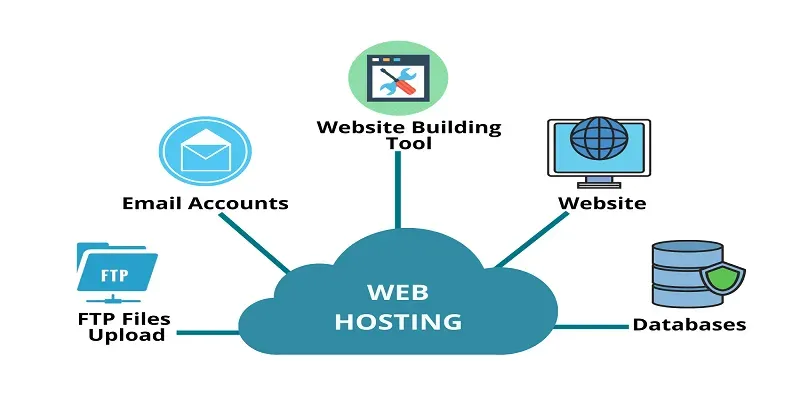
No hosting provider can guarantee perfect 100% uptime. But the difference between ordinary shared hosting and a managed environment is the difference between “we wait until it fails and then react” and “we predict the problem and neutralize it”.
Isolated infrastructure
On ordinary shared hosting, your website “lives” on one server together with dozens or hundreds of others. If one neighbor gets a traffic spike or launches a heavy process, everyone suffers.
In a managed environment, resources are isolated. Your site does not depend on what happens in neighboring accounts. There is also load scaling: if traffic grows during a campaign, resources increase automatically.
Constant monitoring instead of “we heard it from a client”
The worst way to learn about downtime is to receive a message from a client: “Your website is not opening.” By that point, nobody knows how much time has already passed.
Research shows a direct relationship between failure detection time and its cost: monitoring once per minute can cut downtime costs almost in half compared with discovering the issue through customer complaints.
A serious managed hosting provider monitors the website constantly and reacts before the problem becomes visible to users.
Stability under load
Reliable hosting is not just “the website opens”. It means:
- fast loading even during peak traffic
- stable processing of payments and forms
- CDN for even load distribution
- caching that reduces server load
- proper PHP memory and limit settings
These are the parameters that determine whether the website “holds” the load or goes down at the most important moment.
ROI of managed hosting: simple math
Even basic monitoring that costs $100–200 per year gives an ROI of 7–15x. The question is not whether you can afford monitoring — it is whether you can afford to operate without it.
The same logic applies to managed hosting: the cost difference between cheap shared hosting and quality managed hosting may be only a few thousand hryvnias per year. But one incident at the peak of a campaign can cost many times more.
What to do today: protection checklist
Even without moving to new hosting, there are steps you can take right now.
✅ Step 1. Set up free uptime monitoring
UptimeRobot, Freshping, or any other service with checks every 5 minutes. Free. Takes 10 minutes. You will know about the problem immediately, not an hour later.
✅ Step 2. Check the website before the next campaign
Open the order form, go through the full path to payment, check loading speed with PageSpeed Insights. Do it one week before launch, not on launch day.
✅ Step 3. Find out the real uptime of your hosting over the last 30 days
Not the one written in the contract. The real one — from logs or through the same UptimeRobot running for a month. It is eye-opening.
✅ Step 4. Check whether you have an incident response plan
Who receives outage alerts? Who can fix the issue? What is the maximum response time of your hosting support? If there are no answers, that is already a risk.
✅ Step 5. Calculate your financial risk
Use the formula from this article. If the result does not scare you, you are either very well protected or you have not calculated the full loss multiplier yet.
✅ Step 6. Set up a CDN
Cloudflare on the free plan is already a different level of stability and speed. A good CDN can offset part of the load even when there are server issues.
The main conclusion
Most business owners think of hosting as a technical expense. Something that “just needs to work”.
But after you calculate the numbers, it becomes clear: this is not a technical issue. It is a matter of risk management and revenue protection.
According to ITIC, 84% of companies name security and reliability as the main causes of downtime, while one in five small businesses says it cannot survive an incident costing only $10,000.
Downtime is not an “if”. It is a “when”. The only question is how long it lasts and how much it costs.
Prevention is always cheaper than consequences. Reliable managed hosting is not a line item in expenses. It is an insurance policy for your revenue.
Want to understand whether your current infrastructure matches your business growth? Or choose a solution that can handle load during peak campaigns? Submit a request on our website for a free consultation — we will review your situation and choose the optimal solution.

Is your marketing not delivering results? We’ll show you how to fix it.
We analyze your ads, website, and funnel for free — and give you a clear plan to improve performance.

We show you where your budget is being wasted
We identify real growth opportunities — not just “general issues”
We give you a clear action plan, not a 20-page report


Let’s break down your project
Thank you! Your submission has been received!
Oops! Something went wrong while submitting the form.


RELATED ARTICLES

Cookieless Advertising: What Is Changing and How Businesses Can Adapt



Автор:
Viktoriia Halata
Third-party cookies are disappearing — and the old approach to remarketing is disappearing with them. What is replacing it and how businesses can prepare.
Read Article

How Much Website Downtime Costs: Real Numbers, Loss Calculator, and How to Protect Your Business
Автор:
Viktoriia Halata
What website downtime really costs: direct losses, wasted advertising budget, SEO and reputation damage — and how to reduce these risks.
Read Article

Business Relocation Mistakes: Why There Are No Clients
Автор:
Viktoriia Halata
Many entrepreneurs move their business physically, but do not rebuild their sales model for the new market. We break down the most common mistakes after relocation.
Read Article

Post-View Attribution in Simple Terms: Why the Numbers in Ad Platforms and Google Analytics May Not Match

Автор:
Serhii Sek
The ad platform shows sales, while Google Analytics shows fewer. Who is lying, and how should you interpret this data correctly?
Read Article








Залишити заявку
Thank you! Your submission has been received!
Oops! Something went wrong while submitting the form.
